
If you want to track local SERPs effectively, you have to ditch the national-level tools and think hyperlocally. This means getting granular—monitoring how your business ranks not just in a city, but on a specific street corner. That’s the only way to see what a real potential customer sees the moment they search.
Why Generic SEO Tools Fail at Local SERP Tracking
Using a standard, national rank tracker for a business with physical locations is like looking at your performance through a blurry lens. The world of local search just operates differently. A query like "coffee shop near me" can deliver wildly different results from one city block to the next.
This volatility is driven by a few key factors that generic tools simply can't account for, leaving you with data that's not just incomplete, but often dangerously misleading.
The Hyperlocal Nature of Search Results
Google's number one job in local search is to give the user the most relevant result for their immediate physical location. This makes proximity a massive ranking factor. A generic tool might tell you you're ranking #1 for "emergency plumber in Chicago" because it pinged a server somewhere in Illinois, but that data is completely useless. A customer on the North Side sees a completely different SERP than someone on the South Side.
The real search result is a cocktail of variables:
- Geolocation: The user's precise GPS coordinates are the biggest driver of what shows up in the Google Local Pack.
- Device Type: Most local searches happen on mobile, which serves up different layouts than desktop, heavily favoring maps and click-to-call buttons.
- Search History: Personalization adds another layer of complexity, making any one-size-fits-all tracking report unreliable.
Relying on a national rank tracker is like trying to navigate a city using a world map. You can see the country and maybe the state, but you’re missing the streets, neighborhoods, and landmarks—the very things your customers use to find you.
A Real-World Scenario of Misguided Strategy
I once worked with a multi-location retailer with stores dotted across a major city. Their marketing team was using a generic SEO tool that showed a steady #3 ranking for "women's running shoes" across the entire metro area. Feeling confident, they spread their digital ad budget evenly across all locations.
But the actual sales and foot traffic data told a totally different story. The downtown store was crushing it, while the suburban location was dead in the water for that product line.
It wasn't until they switched to a geo-specific tool that could track rankings by zip code that they saw the truth. The downtown store was actually #1 in the Local Pack for anyone searching within a two-mile radius. Meanwhile, the suburban store was completely invisible—nowhere to be found for searches conducted just a few blocks away.
The generic tool had averaged these extremes into a single, useless metric. This flawed data led them to waste ad spend on a location that didn't need ads; it needed foundational SEO work. This is a perfect example of why pinpoint accuracy isn't just a nice-to-have feature; it's a strategic necessity.
Laying the Groundwork for Local Tracking That Actually Works
Before you even glance at a SERP tracking tool, you need to get your house in order. So many businesses jump straight to tracking, see disappointing numbers, and can't figure out why. The problem isn't the tool; it's the foundation.
Trying to track an unoptimized local presence is like trying to measure the speed of a car that's missing its wheels. The data you get will be useless because you haven't given yourself a fair shot at competing in the first place. Let's fix that.
Your Google Business Profile Is Everything
Your Google Business Profile (GBP) isn't just another listing. It's the engine that powers your visibility in the Google Local Pack and on Maps—precisely where most local customers make their decisions.
Don't just take my word for it. The data is clear: Google Business Profile is the single most dominant ranking factor for the local pack and Maps, accounting for a massive 32% of the influence. For any brand, especially those in competitive markets, neglecting GBP is like forfeiting the game before it even starts.
To build this foundation, every single one of your locations needs a profile that’s filled out to the absolute max. This goes way beyond just having the correct address.
- Get Granular with Categories: Are you a "pizza restaurant" or just a "restaurant"? Your primary category has a huge impact on the searches you show up for. Then, layer in secondary categories to cover every single thing you offer.
- Hours Must Be Perfect: This means regular hours and special hours for every holiday. Nothing loses a customer faster than showing up to a business Google said was open, only to find the doors locked.
- Detail Your Services & Products: Use the dedicated Products and Services sections to spell out exactly what you do. This gives Google a rich set of keywords to connect with your business, moving you beyond just your brand name.
- Photos, Photos, Photos: Upload recent, high-quality photos of your storefront, your team, your interior, and your products in action. If you can geotag them, even better—it's another small signal of local relevance.
As you build out this foundational data, it's also smart to think about how you'll collect competitive intelligence down the line. Following web scraping best practices from the start ensures that any data you gather is both reliable and ethically sourced, preserving the integrity of your entire strategy.
Set Goals That Actually Pay the Bills
Once your GBP is dialed in, it's time to define what success really looks like. Chasing a #1 ranking is a vanity metric. It feels good to see it on a report, but it doesn't mean a thing if it isn't driving revenue. Your goal should be to connect every tracking effort directly to a real-world business outcome.
Stop focusing only on rank and shift your attention to Key Performance Indicators (KPIs) that represent actual customer behavior.
Your local SERP tracking dashboard shouldn't just be a list of keyword positions. It should be a business intelligence tool that answers one simple question: "Is our online visibility driving more customers through our doors?"
A national brand with hundreds of locations can't just apply the same goal everywhere. A flagship store in a major city has a completely different potential than a small branch in a suburb. You need to tier your KPIs based on market size and business priority.
Example KPI Structure for a Multi-Location Brand
| Market Tier | Primary KPI | Secondary KPIs | Goal |
|---|---|---|---|
| Tier 1 (Major City) | Phone Calls from GBP | Direction Requests, Website Clicks | Drive high-intent leads and in-store foot traffic. |
| Tier 2 (Suburban) | Website Clicks (Appointments) | Photo Views, Post Engagement | Increase online bookings and build local brand awareness. |
| Tier 3 (Small Town) | Direction Requests | GBP Post Views, Q&A Engagement | Become the top local choice and community resource. |
This tiered approach makes your efforts to track local SERPs strategic. You're no longer just collecting data for the sake of it; you're measuring performance against goals that are custom-fit to each location's unique potential. With this foundation in place, your tracking data transforms from a simple report into a genuine roadmap for growth.
Choosing and Configuring Your Local SERP Tracking Tools
Once your goals are set and your Google Business Profile is dialed in, it's time to pick the right tech to actually track your local SERPs. The market is flooded with options, but frankly, most of them aren't built for the unique demands of hyperlocal monitoring. Switching from a generic national rank tracker to a specialized local tool is a total game-changer. It gives you the clear, granular data you need to make smart, location-specific moves.
The real difference is how these tools simulate a search. A standard tool might ping a server somewhere in your region, giving you a vague, averaged-out ranking. A true local SERP tracker, on the other hand, can mimic a search from a specific street address, a zip code, or even precise GPS coordinates. For any business that depends on foot traffic or local service calls, that level of accuracy isn't a luxury—it's essential.
This whole process fits together logically. You optimize your GBP, define your goals, and then use tracking to measure the results of that foundational work.
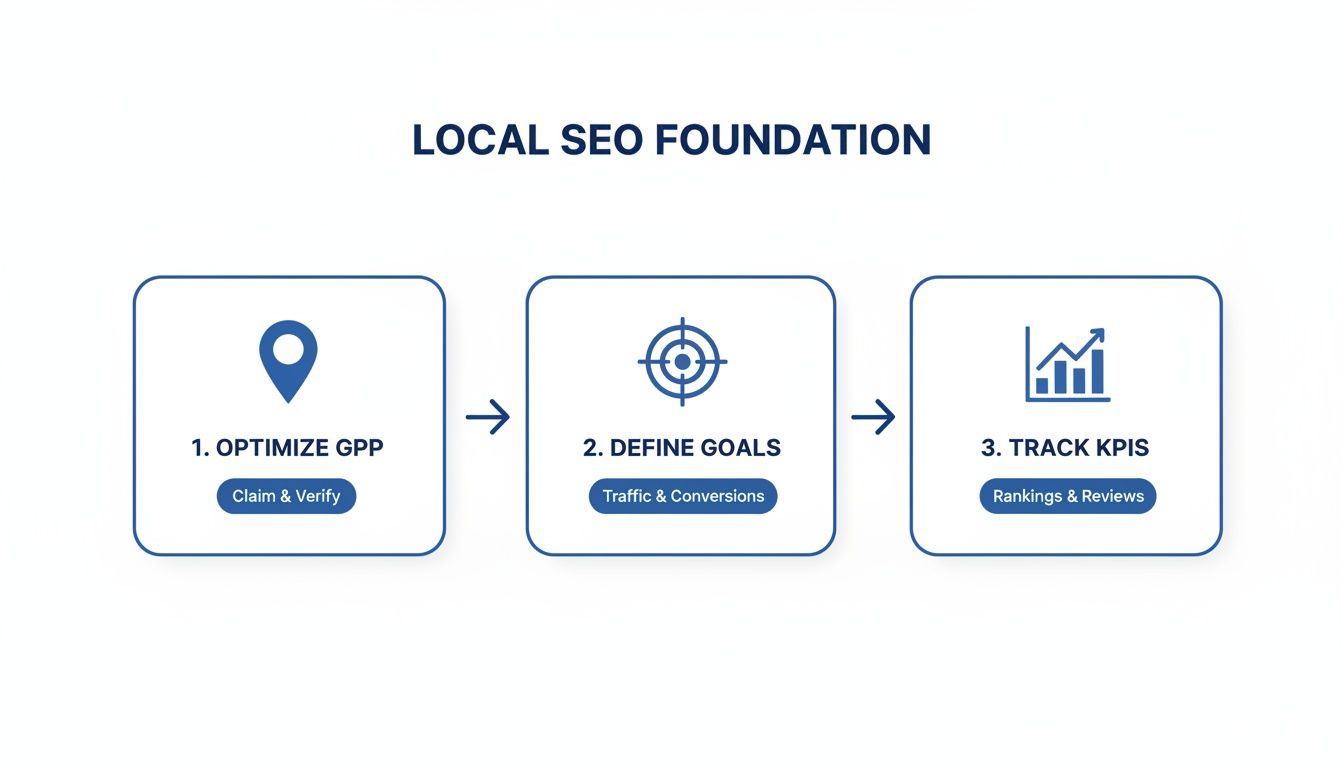
As you can see, tracking is the final piece of the puzzle that validates everything you've done beforehand.
Differentiating Between Tracking Methodologies
Local SERP tracking isn't one-size-fits-all. The tools generally fall into a few camps, each with its own strengths. Your choice really depends on your business model, your budget, and how deep you need to go with the data. For a deeper dive, resources like The Top 12 Local SEO Reporting Tools for Service Businesses in 2025 can offer a ton of great context.
Grid-Based Trackers: These have become incredibly popular for a reason—they give you a powerful visual of your visibility in the Google Maps Local Pack. The tool lays a grid over a specific area (say, a 5-mile radius around your shop) and runs searches from multiple points on that grid. You instantly see where you rank #1 and where you're completely invisible just a few blocks away.
Address-Specific Trackers: This approach lets you input a precise street address to see the SERP exactly as a customer standing on that corner would. It's perfect for understanding your reach in high-value neighborhoods or, my personal favorite, checking your visibility right outside a competitor's front door.
API-Powered Platforms: For big multi-location brands or agencies managing hundreds of clients, API-based solutions are the way to go. They offer maximum flexibility by pulling raw SERP data from thousands of specific geo-coordinates, giving you a massive dataset for deep, custom analysis.
Choosing the right methodology is crucial for getting data that truly reflects what your customers see. The table below breaks down the core differences to help guide your decision.
Comparison of Local SERP Tracking Methodologies
| Tracking Method | Key Feature | Best For | Potential Limitation |
|---|---|---|---|
| Grid-Based Tracking | Visual map of rankings across a geographic area. | Service-area businesses, visualizing ranking decay. | Can be less granular than address-specific checks. |
| Address-Specific Tracking | Simulates a search from a precise street address or zip. | Targeting specific neighborhoods or competitor locations. | Less efficient for visualizing a broad service area. |
| API-Powered Platforms | Raw SERP data access from custom geo-coordinates. | Enterprise, multi-location brands needing custom analysis. | Requires technical expertise to implement and analyze. |
Ultimately, the best tool is the one that aligns with your specific business goals—whether that’s dominating a single neighborhood or managing a national franchise.
Setting Up Your Tracking Configuration
Once you've picked your tool, the setup is where your strategy truly comes to life. Just plugging in your main keywords and business address won't cut it. A thoughtful configuration ensures the data you get back is actually actionable.
Your initial setup has to account for how modern customers search. It’s no secret that mobile is king—over 54% of all web traffic now comes from mobile devices, and mobile SERPs can look wildly different from their desktop counterparts. The Local Pack, for example, is far more dominant on a smaller screen.
A rookie mistake I see all the time is only tracking desktop rankings and assuming mobile is the same. In reality, a business might rank on page one on a laptop but be completely invisible on the mobile SERP for the exact same query. You have to track both.
Here’s a practical checklist to get you started on the right foot:
- Input Specific Locations: Don't stop at your own address. Add the coordinates for major intersections, competitor storefronts, and target residential areas to get a complete 360-degree view of your visibility.
- Separate Mobile and Desktop Tracking: Always create distinct projects or campaigns for each device. This is the only way to spot critical discrepancies and optimize for the mobile-first experience that most of your local customers have.
- Monitor Key SERP Features: Go beyond basic organic rankings. Make sure your tool is configured to specifically track your presence in the Local Pack, the appearance of your Knowledge Panel, and any relevant Featured Snippets you're aiming for.
- Use Geo-Modified Keywords: Track your performance for both broad terms (like "emergency plumber") and geo-modified ones (like "emergency plumber downtown"). This helps you understand how you perform across different types of local search intent.
This kind of meticulous setup transforms your tool from a simple rank checker into a powerful competitive intelligence machine. It’s what gives you the granular data needed to see exactly where you're winning and where you need to focus your local SEO efforts. If you're looking for a platform built for this level of detail, you can explore how to get started with our tools here.
6. Weave Reputation Signals into Your Monitoring
So you’ve landed a top spot in the Local Pack. That’s a huge win, but it's only half the battle.
What a potential customer sees after they find you is what really seals the deal. We're talking about your star rating, the tone of recent reviews, and the photos people have shared. These elements determine whether they tap to call, get directions, or just scroll right past you. This is why you can't truly track local serps without keeping a close eye on your online reputation.
These aren't just fluffy customer service metrics; they are hard local ranking factors. Google wants to send its users to businesses they can trust, and it uses signals like review frequency, sentiment, and how quickly you respond to gauge that trust. A high ranking gets you seen, but a strong reputation gets you chosen.
Connecting the Dots Between Rankings and Reputation
The smartest local monitoring strategies don't just look at SERP data in a vacuum. They merge it with reputation metrics. When you lay these two datasets side-by-side, powerful correlations start to jump out. For instance, did your rankings for "best brunch spot" suddenly tank right after a string of unanswered one-star reviews? It's probably not a coincidence.
A truly integrated workflow should include tracking:
- Review Velocity: How often are new reviews coming in? A consistent flow tells Google your business is active, popular, and relevant right now.
- Sentiment Analysis: Are people generally happy or not? Automatically tagging reviews as positive, negative, or neutral helps you spot operational trends that could be tanking your reputation and, by extension, your rankings.
- Response Rate: How fast and how often do you reply to reviews? Google explicitly states that it rewards businesses that engage with their customers.
Think of it as a flywheel. Good SERP performance drives visibility, which brings in more customers, who then leave more reviews. The way you handle those reviews directly impacts your reputation signals, which then fuels your future SERP performance.
A Real-World Gut Punch: How Reputation Kills Rankings
I once worked with a restaurant chain that couldn't figure out why one of its locations was a ghost in local search. While their other branches consistently owned the top three spots for key terms, this one was buried on the second page of Maps. We ran an initial SEO audit, and everything looked fine—the GBP was perfectly optimized and their on-page SEO was solid.
The problem wasn't their keywords; it was their customer service, playing out in public.
A deeper dive showed a cluster of scathing negative reviews that had all popped up over a two-week period. They all complained about the same thing: a new manager. The real kicker? The business hadn't answered a single one of them.
This radio silence sent a deafening negative signal to Google. To the algorithm, the business looked like it just didn't care. As soon as the regional manager was alerted, stepped in, and responded thoughtfully to every review, their local rankings started climbing back within a month.
It was a stark reminder that online reputation isn't a separate, fluffy marketing task—it's a core component of local SEO. If you really want to get this right, the insights from top AI reputation management consultants can be a game-changer.
Build an Early-Warning System for Reputation Hits
You can't afford to wait for a monthly report to tell you that your reputation is on fire. You need a system that flags problems in real-time so you can jump on them immediately.
Set up automated alerts that trigger for these key events:
- New Negative Reviews: This is a no-brainer. Configure your tool to fire off an instant email or Slack notification for any review that's three stars or less. This empowers your team to respond in hours, not days.
- New GBP Questions: Your Google Business Profile's Q&A section is a magnet for misinformation. An alert for new questions lets you jump in with an official answer before a well-meaning—but wrong—customer does.
- Mentions Without a Review: Keep tabs on brand mentions across local blogs or social media. A glowing mention is a great opportunity to say thanks, while a negative one requires a fast, careful response.
By integrating these alerts, your passive tracking setup becomes an active defense system, protecting both your search rankings and your brand's hard-won reputation.
Monitoring Your Brand in AI Overviews and Assistants
Welcome to the new frontier of local search. The familiar blue links and map packs are now sharing the stage with something entirely different, and if you're not paying attention, you're already falling behind.
AI assistants like ChatGPT and Google’s own AI Overviews are quickly becoming the first stop for users looking for local recommendations. This isn't just a small tweak to the algorithm; it's a fundamental change in how customers find you. If your strategy is still laser-focused on traditional SERPs, you’re flying completely blind in this new arena.
The New Risks AI Presents to Local Brands
The single biggest problem with AI-driven search is its unnerving ability to be confidently wrong. These AI "hallucinations" aren't just minor glitches; they can be devastating for a local business.
An AI model might invent incorrect business hours, declare one of your locations permanently closed, or—worst of all—recommend a direct competitor when a user asks for exactly what you provide. This isn't a hypothetical threat. It's happening right now. A single bad AI response can cost you a customer, and you'll never even know you lost them because that interaction leaves no trace in your website analytics or GBP Insights.
This shift has massive implications. Local searches are revenue machines, converting at an astounding 80% rate. We know that 76% of people who search for something local on their phone visit a business within 24 hours, and 28% of those visits result in a sale. The local pack is prime real estate, capturing 44% of clicks, but AI Overviews are now intercepting that attention before users even get there.
Proactive Monitoring in a Conversational World
You can't optimize what you can't see. Thriving in this new landscape means you have to actively monitor what these AI assistants are saying about your brand, and that requires a totally different approach from traditional rank tracking.
Instead of just plugging in keywords, you need to start thinking in terms of prompt-based tracking. This means systematically asking the AI the same kinds of questions your customers would, such as:
- "What's the best Italian restaurant near downtown?"
- "Which hardware store is open late on Sundays?"
- "Recommend a reliable plumber in my area."
By running these prompts from various geographic locations, you start to build a real picture of your brand's visibility—or its invisibility—inside these powerful AI ecosystems.
In the age of AI, your brand reputation is no longer just what customers say about you in reviews. It’s also what a machine says about you in a generated summary. If that summary is wrong, the damage is immediate.
Advanced platforms are now built specifically to scan these AI responses at scale. They can turn this potential threat into an actionable intelligence channel, cross-referencing AI-generated information with your actual business data to instantly flag dangerous inaccuracies.
Turning AI Blind Spots into Competitive Insights
This kind of monitoring isn't just about playing defense; it's a goldmine for competitive intelligence. When you see an AI recommend a competitor over your business, the immediate follow-up question should always be, "Why?"
Specialized tools can dig into the sources the AI cites for its recommendations. This process reverse-engineers the AI's logic, revealing exactly what content, reviews, or data points influenced its decision. Maybe a competitor is constantly featured in "best of" listicles from local blogs, or perhaps their GBP profile is packed with descriptive, keyword-rich reviews from happy customers.
By uncovering these patterns, you get a crystal-clear roadmap of the content and reputation gaps you need to fill. This transforms a frustrating blind spot into a strategic advantage for winning in the new world of AI-driven search. For agencies managing this complexity for clients, getting a handle on LLM visibility tracking is no longer a "nice-to-have"—it's becoming essential.
Turning Local Tracking Data into Business Actions
Collecting endless streams of local SERP data is the easy part. The real challenge—and where the money is made—is turning that firehose of information into a repeatable process that actually drives growth. Raw data is just noise until you build a system to interpret it, assign ownership, and trigger specific actions.
This is exactly where most businesses stumble. They invest in powerful tools but fail to build the operational muscle to act on what those tools are telling them. The goal is to create a tight feedback loop: tracking data fuels smart decisions, which lead to better visibility, which in turn generates more data.
Establishing a Practical Reporting Cadence
Look, not every location needs the same microscopic level of scrutiny. A flagship store in a cutthroat urban market demands way more attention than a small branch in a sleepy suburb. A one-size-fits-all reporting plan will either drown your team in useless noise or cause them to miss critical signals.
To get it right, you need a tiered cadence:
- Weekly Checks: Save these for your crown-jewel locations. The focus here is tight: volatile, high-intent keywords, Local Pack visibility, and any new reputation alerts. This is your rapid-response check-in, designed to catch problems before they snowball.
- Monthly Reviews: This is the rhythm for the rest of your locations. A monthly report gives you a broader view of performance trends. It's where you analyze the slower-moving metrics, compare month-over-month performance, and spot larger strategic opportunities.
- Quarterly Strategy Sessions: Time to zoom out. Use these meetings to look at market-wide trends, see how competitors are shifting their strategies across different regions, and use all that accumulated data to fine-tune your local SEO plan for the next quarter.
This structured approach makes sure your team’s valuable time is spent on the locations that matter most, without letting other branches fall completely off the radar.
Designing Dashboards for Different Stakeholders
The report that a regional marketing manager needs looks nothing like what a C-suite executive wants to see. If you serve up the wrong level of detail to the wrong audience, you can bet your reports will be ignored. Your dashboards have to be built for the person reading them.
A great local SEO dashboard tells a story. For an executive, it's a short story about ROI. For a manager, it's a detailed novel about what's working, what's broken, and who needs to fix it.
Think about building out a few templates like these:
| Stakeholder | Key Metrics | Primary Question Answered |
|---|---|---|
| C-Suite Executive | Overall Local Pack visibility, competitor market share, ROI from local search. | Is our investment in local SEO paying off? |
| Regional Manager | Location-specific rankings, review sentiment trends, GBP conversion actions. | Which locations are underperforming and why? |
| Local Store Manager | New reviews, GBP Q&A, Knowledge Panel accuracy. | What immediate actions can I take to improve my store's online presence? |
When you build these role-specific views, the data becomes instantly relevant and actionable for every person who sees it.
Automating Alerts to Drive Immediate Action
The most powerful part of any system to track local serps is its ability to act as an early-warning system. You can't afford to wait for a weekly report to find out a key location fell off the map. For this reason, automated alerts are completely non-negotiable. They empower your team to react in real-time.
Imagine a customer is standing on a street corner, searching 'coffee near me.' A staggering 84% of these local searches happen on mobile devices, making it the undeniable king for discovering nearby businesses. With these kinds of searches growing 50% faster than general mobile queries and over 1.5 billion 'near me' searches happening every month, you can't afford to miss a single impression. You can dive deeper into these local SEO statistics to see just how critical immediate action is.
You need to set up automated triggers for these mission-critical events:
- Significant Ranking Drops: If a high-value keyword for a priority location falls out of the top three in the Local Pack, an immediate alert should land in the relevant manager's inbox.
- New Negative Reviews: Any review of three stars or less should trigger a notification directly to the local store manager, giving them the power to respond within hours, not days.
- Knowledge Panel Inaccuracies: If your tool detects that Google is showing the wrong business hours, an incorrect phone number, or—worst of all—a "permanently closed" label, it needs to fire off a high-priority alert to your core digital team right away.
By turning data points into automated triggers, you transform your monitoring from a passive reporting function into an active defense system. This is the operational framework that ensures insights don't just sit in a dashboard—they drive the daily actions that protect your brand and fuel your growth.
Ready to see what AI assistants are really saying about your brand? TrackMyBiz gives you the visibility you need to protect your reputation and turn AI-driven discovery into a powerful acquisition channel. Start your free scan today at https://trackmybusiness.ai.
