Using hashtags on Facebook is one of the easiest ways to get more eyes on your content. Think of them as searchable keywords that sort your posts into relevant streams, making it a breeze for people interested in your topics to find you—even if they’ve never heard of you before.
Why Facebook Hashtags Still Matter for Your Strategy
Let's clear something up. There's a common myth that hashtags just don't hit the same on Facebook as they do on Instagram or TikTok. And while user behavior is definitely different, the core purpose is identical: to improve discoverability and categorize content.
When you add a hashtag to your post, it instantly becomes part of a virtual, clickable feed dedicated to that topic. This is a huge opportunity. Anyone, follower or not, can stumble upon your content simply by searching for a tag they care about.
Expanding Your Organic Reach
Each hashtag is a bridge to a new audience. Without them, your post is pretty much limited to your followers and their friends. But add a simple tag like #LocalArtFair, and you suddenly connect with a whole community of local art lovers who are actively looking for that kind of content.
This is especially powerful for:
- Targeting Niche Communities: Connect with people who share specific passions, from
#VintageCarRestorationto#VeganBaking. - Boosting Local Visibility: Use location-specific tags like
#ChicagoEatsto pull in customers right in your neighborhood. - Joining Trending Conversations: Hop on timely events or discussions to get a burst of immediate exposure.
Driving Meaningful Engagement
Hashtags don't just get you more views; they get you the right views. Someone who finds your content through a specific tag is already interested in what you're talking about, which means they're far more likely to actually engage. If you want to dive deeper, check out this quick guide on boosting engagement with Facebook hashtags.
The key is to be strategic. Don't just tack on hashtags as an afterthought. Use them as a deliberate tool to connect your message with the right people at the right time.
The data backs this up, and it consistently shows that less is more. One recent study found that posts with just one hashtag averaged 593 interactions. But when that number jumped to over ten hashtags, interactions plummeted to just 188.
It’s proof that a few well-chosen tags will always outperform a spammy, cluttered list.
To cut to the chase, here’s a quick overview of what a solid hashtag strategy on Facebook looks like.
Facebook Hashtag Strategy At a Glance
| Principle | Best Practice | Why It Works |
|---|---|---|
| Keep It Lean | Use 1-3 highly relevant hashtags per post. | Avoids looking spammy and keeps the focus on your core message. The algorithm often favors quality over quantity. |
| Prioritize Relevance | Choose tags that directly relate to your content, industry, or location. | Attracts an audience that is genuinely interested in your topic, leading to higher-quality engagement. |
| Mix It Up | Combine broad, community, and branded hashtags. | A broad tag (#DigitalMarketing) increases reach, a community tag (#ShopLocalChicago) targets a niche, and a branded tag (#YourBrandEvent) builds identity. |
| Check Your Privacy | Ensure your profile or post is public. | Hashtags only work for discoverability on public content. Private posts won't show up in hashtag searches for non-followers. |
Sticking to these core ideas will help you avoid common mistakes and get the most out of every tag you use.
Finding the Right Hashtags for Your Brand
Choosing the right hashtags isn't about chasing viral trends or guessing what might work. It's a game of strategy and research. Your real goal is to find the tags your ideal customers are already searching for and using themselves. This is how you join their conversations instead of just shouting into the void.
The simplest place to start is right inside Facebook's search bar. Type in a core keyword for your post—say, "coffee"—and pay close attention to the hashtag suggestions that pop up. This is a real-time peek into what's currently popular and relevant on the platform.
Analyze Your Competitors and Industry Leaders
Some of the best hashtag ideas are hiding in plain sight on your competitors' Facebook pages. Take a look at what successful brands in your space are using. Specifically, zero in on the posts with the highest engagement and make a note of the hashtags they included.
This isn't about blind copying. It's about spotting patterns. Are they leaning into local tags, community-focused phrases, or broad industry terms? This simple analysis can uncover high-performing keywords you might have missed. If you're serious about this, using a dedicated brand monitoring tool can streamline the process, showing you exactly where the conversations in your industry are happening. (https://trackmybusiness.ai/chatgpt-brand-monitoring-ecommerce)
You should also identify the key influencers and thought leaders your audience follows. The hashtags they use are almost always well-researched and proven to connect with your target demographic. Their choices can be a fantastic source of inspiration.
Ever clicked on a hashtag and gone down a rabbit hole of amazing content? That's the power of discoverability. On a platform with 3.1 billion global users, tags like #trending (with 875 million uses) or #fitness (at 196 million) can make a post explode. Even niche tags like #workout hit 66 million uses.
Create Your Hashtag Mix
The most effective strategies don't just rely on one type of hashtag. You need a balanced portfolio. Think of it as creating a "hashtag mix" for every post, blending different types of tags to serve different purposes and maximize your reach.
A solid structure to follow includes these three categories:
- Broad Hashtags: These are the big, general terms like
#SocialMediaMarketingor#Coffee. They offer massive potential reach, but your content can easily get lost in the noise. Use one, maybe two, sparingly. - Community Hashtags: These are more specific tags that tap into a dedicated audience, like
#MorningRitualor#ShopLocal. The volume is lower, but the audience is far more engaged and relevant. - Branded or Niche Hashtags: These are tags unique to your business, campaign, or location, such as
#AustinTXor#YourBrandName. They're perfect for building a community and tracking user-generated content around your brand.
For example, a local bakery in Austin could use #Bakery (broad), #FreshlyBaked (community), and #ATXEats (niche/local). This combo taps into different audience segments, giving the post the best possible shot at being seen by the right people. By mastering this mix, you'll learn exactly how to use hashtags in Facebook to hit your specific goals.
Where to Place Your Hashtags on Facebook for Maximum Impact
Knowing what hashtags to use is only half the battle. Where you put them can make the difference between a seamless, engaging post and one that feels clunky and desperate. The right placement makes your hashtags feel like a natural extension of your content, not a tacked-on afterthought.
Let's break down the best spots to place your hashtags across Facebook's different features.
The Classic Debate: In Your Copy vs. At the End?
For a standard Facebook post, you've got two main schools of thought. There's no single right answer, but each has its own vibe and strategic advantage.
Weaving Hashtags Directly Into Your Sentences
One approach is to sprinkle your hashtags right into the body of your post. When done well, this feels incredibly organic and conversational, making the tags an integral part of your message.
A local coffee shop could pull this off perfectly: "Our baristas are getting ready for this weekend's #LatteArt competition! Come cheer them on and grab some of the best #AustinCoffee you've ever tasted." See how that flows? The tags add value without interrupting the reader.
This method keeps the focus squarely on your main message. The only catch is that it can get awkward fast if the hashtag doesn't fit naturally. Forcing it can make your sentences clunky and hard to read.
My two cents: If you're weaving hashtags into your copy, less is more. Stick to one or two max. Overloading a sentence with tags is a surefire way to look spammy and turn readers off.
Grouping Hashtags at the End of Your Post
The other popular—and often safer—method is to place a block of hashtags at the very end of your caption. This keeps your core message clean, polished, and easy to read.
It creates a clear separation, signaling to users that these tags are for categorization and discovery, not part of the main narrative. Many brands prefer this clean, professional look. It also gives you a dedicated space to experiment with different hashtag combinations without having to rewrite your entire caption every time.
Going Beyond the Post: Hashtags in Stories, Groups, and Events
Hashtags aren't just for your main feed. They play a powerful role in other parts of Facebook, too.
In Facebook Stories, you can use the interactive hashtag sticker. This is a game-changer. Instead of getting lost in text, the sticker makes your hashtag a prominent, tappable button. When someone taps it, they're taken to a feed of other posts and Stories using that same tag, which is fantastic for discovery.
For Facebook Groups, hashtags are an organizational godsend. Admins and members can use them to categorize posts, turning a chaotic feed into a searchable library.
- Use
#WeeklyChallengeto bundle all posts for a recurring activity. - Tag
#QandAto create an easy-to-find thread of all your Q&A sessions. - Collect member wins under
#SuccessStoriesto highlight social proof.
Finally, don't forget Facebook Events. Creating a unique event hashtag, like #BrandNameSummit2025, is a must. It builds buzz before the event and, more importantly, aggregates all the photos and posts from attendees into one single, powerful stream you can use later.
How Many Hashtags Should You Use? (And How to Pick Good Ones)
When you're figuring out how to use hashtags on Facebook, the biggest mistake is treating it like Instagram. While a dozen tags might fly on IG, Facebook's algorithm and its users prefer a much cleaner, more focused approach.
Overloading your posts with hashtags doesn't just look messy; it can actively hurt your engagement.
The golden rule here is less is more. I've seen it time and time again: performance drops off a cliff when posts are cluttered with tags. The sweet spot is almost always one to three highly relevant hashtags. This strategy tells both users and the algorithm that your content is specific and valuable, not just another post screaming for attention.
Okay, So What Makes a Hashtag "Relevant"?
A good hashtag is more than just a keyword with a pound sign. An effective hashtag actually does three things at once, making sure it connects with the right people for the right reason.
Before you pop a tag on your post, run it through this quick mental checklist:
- Does it actually describe the content? The tag should be a direct, honest label for your photo, video, or update.
- Is it something my audience would search for? Get inside your ideal customer's head. What terms would they use?
- Does it fit my brand's voice? A playful tag like
#GoodEatsmight be perfect for a cafe but would feel jarring from a law firm.
A relevant hashtag is a promise you make to the user. It says, "If you click this, you'll find more great stuff just like what you're seeing now." Break that promise with lazy, irrelevant tags, and you'll lose trust and engagement fast.
This graphic breaks down where you can strategically place hashtags across different Facebook features to get the most out of them.
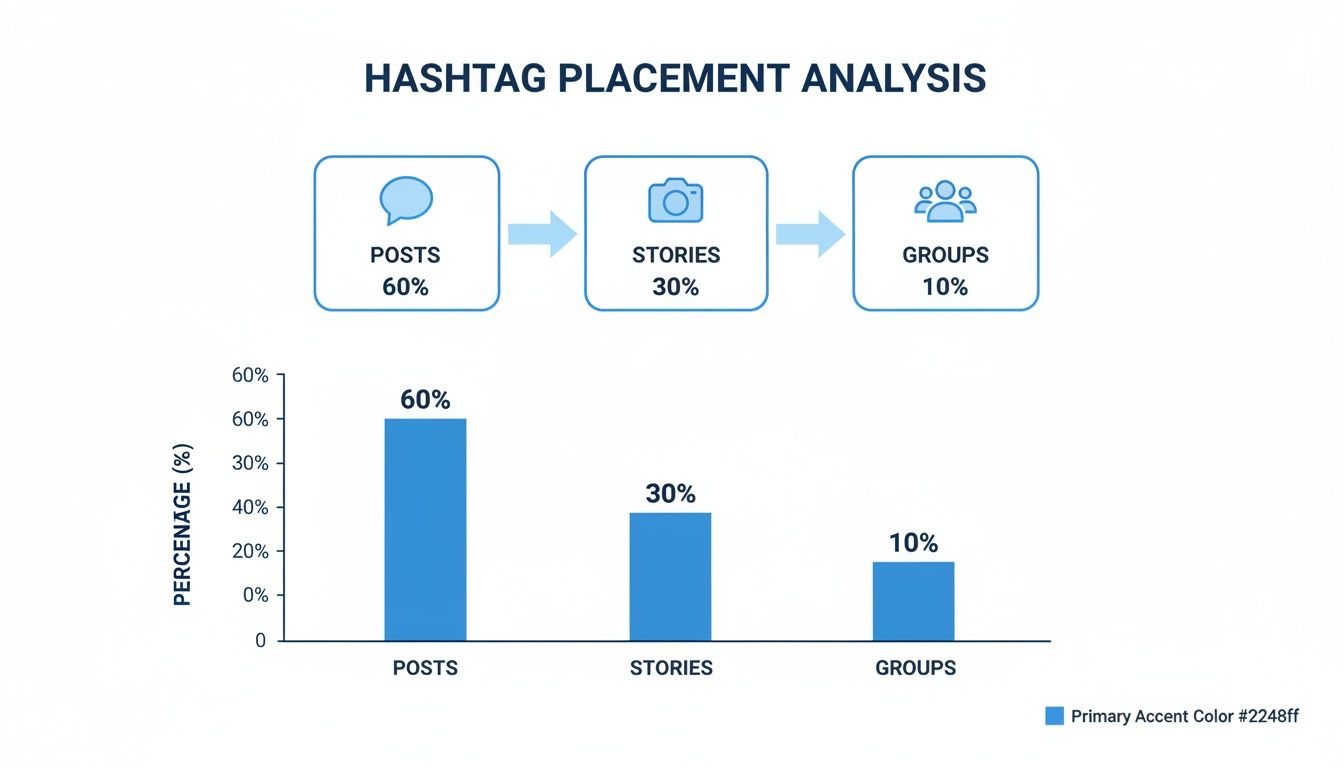
As you can see, your main posts are the primary home for hashtags. But don't sleep on using them in Stories and Groups—it's a great way to categorize content and drive interaction in more focused, niche communities.
Thinking about the number of hashtags can feel tricky, so I put together this simple table to show the general relationship between quantity and performance.
Hashtag Quantity vs. Expected Engagement
| Number of Hashtags | Typical Engagement Impact | Best For |
|---|---|---|
| 1-3 | Highest | Driving targeted reach and discovery without looking spammy. |
| 4-7 | Moderate | Niche topics or campaigns where multiple specific tags are needed. |
| 8+ | Lowest | Generally hurts engagement; can be perceived as spam by users. |
The takeaway is clear: being highly selective pays off. A few powerful hashtags will always outperform a dozen generic ones.
Seeing the Difference in Practice
Let's make this real. Imagine you run a local bookstore and you're posting about an exciting new fantasy novel that just came in.
The Wrong Way (Too Many Generic Tags):
"Our new favorite fantasy book is here! Come grab your copy today. #book #books #booklover #read #reading #fantasy #new #bookworm #mustread #instagood #picoftheday"
This version is a total mess. The tags are so broad that your post will get lost in a sea of millions of unrelated posts. It feels desperate and fails to connect with a specific type of book lover.
The Right Way (Strategic, Relevant Tags):
"Our new favorite fantasy book has arrived! If you're a fan of epic world-building, you have to check this one out. We can't wait to hear what you think! #FantasyReads #BookstoreFinds #ShopLocal"
See the difference? This approach is clean, focused, and smart. #FantasyReads targets people with a specific interest. #BookstoreFinds appeals to those who love the thrill of discovering a new book in person. And #ShopLocal connects with your community.
Each tag has a job to do, attracting a much more qualified and engaged audience. That’s the goal.
Measuring Your Hashtag Performance
Using hashtags without tracking what they do for you is like shouting into the wind. To really get a handle on how to use hashtags on Facebook, you need to connect your efforts to actual, measurable results. It’s time to move past guesswork and let the data tell you what’s working and what isn’t.
The good news? You don't need a bunch of complicated, expensive software to get started. The tools you need are already built right into your Facebook Page.
Unlocking Insights with Facebook's Native Tools
Your first stop should always be Facebook Insights. This dashboard is a goldmine of information about your post performance. Just head over to the "Posts" section to see a full breakdown of every single piece of content you've published.
Look for two key metrics sitting side-by-side: Reach and Engagement. Reach tells you how many unique people saw your post, while engagement is all about the likes, comments, and shares it earned. This is where you can start connecting the dots.
For instance, do you notice that posts using your branded tag #YourBrandCommunity consistently get higher engagement, even if the reach is a bit smaller? That’s a powerful sign that the hashtag is truly resonating with your core, most loyal audience.
Tracking performance isn't just about finding the winning hashtags; it's about understanding why they win. The data reveals the topics, formats, and tones that actually connect with the people you’re trying to reach.
The Power of Simple A/B Testing
One of the most effective ways to sharpen your strategy is with some simple A/B testing. It sounds technical, but it’s incredibly straightforward. The whole idea is to change just one thing—in this case, your hashtags—to see how it impacts performance.
Here’s a practical way to do it:
- Create Two Similar Posts: Plan two pieces of content that are almost identical in topic, format, and tone. Think two different photos of your best-selling product, posted a day or two apart.
- Use Different Hashtag Sets: For the first post, try a set of broader, more popular hashtags (e.g.,
#CoffeeLover). For the second, go with a more niche, targeted set (e.g.,#SupportLocalCoffee). - Compare the Results: After a few days, pop back into your Insights. Did one set of hashtags lead to a noticeably higher reach or a better engagement rate?
This simple process gives you clear, actionable feedback directly from your audience. When it's time to dig deeper, understanding the various Facebook Page analytics tools can give you an even clearer picture.
Over time, these small tests build a powerful, data-driven foundation for your entire content plan. And for those looking to get a serious edge, you might want to check out our guide on AI-powered competitor analysis tools.
Common Hashtag Mistakes to Avoid
Even the most brilliant content can fall flat with a bad hashtag strategy. A huge part of learning how to use Facebook hashtags is knowing what not to do. Dodging these common pitfalls will instantly boost your content's credibility and reach.
One of the most common mistakes is creating hashtags that are way too long or complicated. Something like #OurAnnualSummerSaleIsFinallyHere is a nightmare to read and completely impossible to remember. Nobody is searching for that.
Pro Tip: Keep your hashtags short, simple, and easy to type. If you can't say it out loud easily, it's probably too complicated for a hashtag.
Another major misstep? Using tags that are completely irrelevant or just plain spammy.
Spammy and Irrelevant Tags
Tossing in tags like #likeforlike or #followme is a fast way to tank your credibility. These tags are magnets for bots and users who have zero genuine interest in your business. It just signals desperation, not value.
Equally dangerous is jumping on a trending hashtag without understanding the context. A tag could be trending for terrible reasons, and associating your brand with that conversation can do real damage to your reputation. Always, always click the tag to see what the conversation is about before you use it. This simple check is a crucial part of managing your brand's image, and working with specialized AI reputation management consultants can help you master this complex area.
Here are a few other key mistakes to steer clear of:
- Using Too Many Hashtags: We've said it before, but it's worth repeating: Facebook isn't Instagram. Stick to 1-3 super relevant tags. More than that looks cluttered and can dilute your core message.
- Forgetting Punctuation Rules: Hashtags can't have spaces or special characters like apostrophes. If you write
#customers'choice, the link will break and only point to#customers. - Using the Same Hashtags on Every Post: Copying and pasting the same list of tags is a red flag for the algorithm. It can mark your content as repetitive or spammy. Always tailor your hashtags to fit the specific photo, video, or update you're sharing.
Facebook Hashtag FAQs
Alright, let's get into the nitty-gritty. When you're actually in the middle of crafting a post or planning a campaign, a few specific questions always seem to pop up. Here are the quick answers to the most common ones I hear.
Do My Privacy Settings Mess with Hashtag Visibility?
Yes, they absolutely do, and this is probably the single most important thing to get right.
If your personal profile is private or you set a specific post's audience to "Friends," your hashtags will only be visible to that same group. People who aren't your friends will not see your post when they search for that hashtag.
For a hashtag to actually help new people discover you, the post itself must be set to "Public." No exceptions.
Are Hashtags Actually Effective in Facebook Reels?
They're not just effective; they're essential. You should definitely be using them.
Just like on Instagram or TikTok, hashtags on Reels are a direct signal to Facebook's algorithm. They help it figure out what your video is about and who it should show it to.
Using a few on-point hashtags in your Reels—think
#DIYTipsor#EasyRecipes—tells the algorithm exactly who your ideal viewer is. This is your best shot at getting your Reel to land on the feeds of non-followers and driving a ton of organic reach.
How Do I Create and Track a Branded Hashtag?
Creating one is easy. The real work is in making it stick.
- Make it unique and memorable. You want something that’s easy to spell and obviously connected to your business or a specific campaign. Something like
#TrackMyBizAIor#BrandNameSummerSaleworks well. - Promote it relentlessly. Put it in your Facebook bio, use it in your own posts, and most importantly, give your followers a reason to use it when they share their own content related to you.
- Track it manually. The simplest way to see who's using your tag is to just click on it. This pulls up a live feed of every public post that has included your hashtag, giving you a real-time look at user-generated content and brand mentions.
Ready to see what AI assistants are saying about your brand? TrackMyBiz gives you the full picture, from competitor recommendations to flagging harmful misinformation. Start a free scan at https://trackmybusiness.ai and turn AI-driven discovery into your new advantage.
